How to connect the 760 Expansion Battery to the 767 Power Station?
Connection:
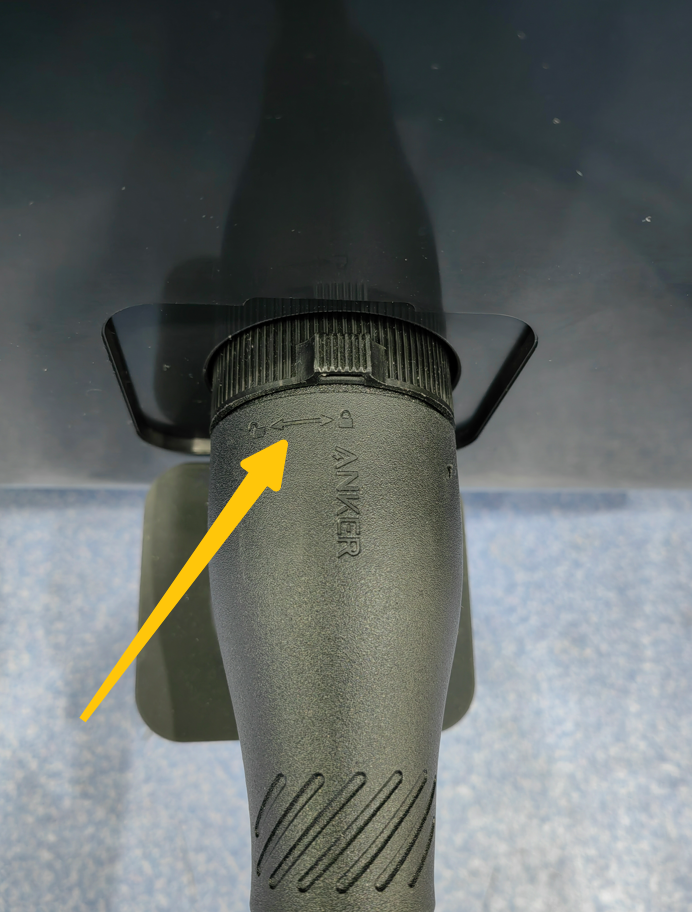
To connect, align the cable with the Anker logo in the center and insert it directly into the power station. (shown in the figure below)
Disconnection:
To disconnect, push the knob in the center of the cable and turn it 12.5 degrees counterclockwise before pulling it out. (shown in the figure below)
Details:
Connect the expansion battery to the power station with the included charging cable.
The expansion battery icon will appear on the power station's screen, and you will hear a beep sound when it is successfully connected. If not, you will have to reconnect both devices, as there may be a loose or poor connection.
The sequence of power usage: After connecting an expansion battery, Its power will be used first until its battery runs out. Then the power station battery will continue to provide power (output) to the connected devices with the power station automatically.
If you need to disconnect or separate the expansion battery from the power station, press the on/off button for 2 seconds to turn the battery “off” to avoid a short circuit. To disconnect, push the knob in the center of the cable and turn it 12.5 degrees counterclockwise before pulling it out.
If you have any questions, please contact us for further assistance.