2.1.6 Error E52: Grid-side phase loss
2.1.7 Error E53: Grid-side neutral line not connected
2.1.8 Error E34: Circuits 7 & 8 are set to PV, but loads are connected
2.1.9 Error E35: Circuits 7 & 8 are set as loads but connected to power generation equipment
2.1.10 Error P12: Off-grid Port Grid Connection Abnormal
2.1.11 Error P14: Grid Port Wiring Abnormal
2.1.12 Error P15: Off-grid Port Wiring Abnormal
2.1.13 Error M9: PV1 Reverse Connection
2.1.14 Error M10: PV2 Reverse Connection
2.1.15 Error M32: PE/N line connection abnormal
4. Generator: no device page on App
5. Generator: Auto Start/Stop not working
6. Generator: charging power low
7. Generator: recoil starter not working
8. Generator: shut down unexpectedly
Model Reference
1. Common Operations
2. Functional Issue
2.1 Error Code
2.1.1 Error E4: Circuit breaker between Automatic Transfer Switch Box and Combiner Box is disconnected
Applicable Scenario: Automatic Backup System (A17E1 & AX170 & A7320)
Symptom: Error E4, Circuit breaker between Automatic Transfer Switch Box and Combiner Box is disconnected
Solution:
1. Press the ESS button on the panel to shut down the device, disconnect all AC switches, and wait for 5 minutes.
2. Contact an electrician to check and ensure the L1/L2 connections between the Automatic Transfer Switch Box and Combiner Box are secure and reliable.
3. Ensure the circuit breaker between the Automatic Transfer Switch Box and Combiner Box is in the ON state.
4. Close all AC switches and press the ESS button again to start the device.
5. If the alarm persists, please upload logs and contact Anker Customer Service Center.
2.1.2 Error E5: L1 L2 phase sequence inconsistency between Automatic Transfer Switch Box and Combiner Box
Applicable Scenario: Automatic Backup System (A17E1 & AX170 & A7320)
Symptom: Error E5, L1 L2 phase sequence inconsistency between Automatic Transfer Switch Box and Combiner Box
Solution:
1. Press the ESS button on the panel to shut down the device, disconnect all AC switches, and wait for 5 minutes.
2. Contact an electrician to correctly connect L1 and L2 according to the Automatic Transfer Switch Box silkscreen instructions.
3. Close all AC switches and press the ESS button again to start the device.
4. If the alarm persists, please upload logs and contact Anker Customer Service Center.
2.1.3 Error E37: L1 L2 phase sequence inconsistency between Automatic Transfer Switch Box and Combiner Box
Applicable Scenario: Automatic Backup System (A17E1 & AX170 & A7320)
Symptom: Error E37, L1 L2 phase sequence inconsistency between Automatic Transfer Switch Box and Combiner Box
Solution:
1. Press the ESS button on the panel to shut down the device, disconnect all AC switches, and wait for 5 minutes.
2. Contact an electrician to correctly connect L1 and L2 according to the Automatic Transfer Switch Box silkscreen instructions.
3. Close all AC switches and press the ESS button again to start the device.
4. If the alarm persists, please upload logs and contact Anker Customer Service Center.
2.1.4 Error E59: N-line connection abnormality between Automatic Transfer Switch Box and Combiner Box
Applicable Scenario: Automatic Backup System (A17E1 & AX170 & A7320)
Symptom: Error E59, N-line connection abnormality between Automatic Transfer Switch Box and Combiner Box
Solution:
1. Press the ESS button on the panel to shut down the device, disconnect all AC switches, and wait for 5 minutes.
2. Contact an electrician to ensure the N-line connection is normal.
3. Close all AC switches and press the ESS button again to start the device.
4. If the alarm persists, please upload logs and contact your dealer/Anker Customer Service Center.
2.1.5 Error E9: Communication abnormality between the Automatic Transfer Switch Box and the Combiner Box
Applicable Scenario: Automatic Backup System (A17E1 & AX170 & A7320)
Symptom: Error E9, Communication abnormality between the Automatic Transfer Switch Box and the Combiner Box
Solution:
1. Re-plug the communication cable between the Automatic Transfer Switch Box and Combiner Box to ensure normal connection.
2. If the error persists, please upload the log and contact the distributor/Anker Customer Service Center.
2.1.6 Error E52: Grid-side phase loss
Applicable Scenario: Automatic Backup System (A17E1 & AX170 & A7320)
Symptom: Error E52, Grid-side phase loss
Solution:
1. Press the ESS button on the panel to shut down the device, disconnect all AC switches, and wait for 5 minutes.
2. Contact an electrician to check whether the L1/L2 line connections between the Power Dock and the grid are correct.
3. After confirming the wiring is correct, close all AC switches and press the ESS button again to start the device.
4. If the alarm persists, please upload logs and contact Anker Customer Service Center.
2.1.7 Error E53: Grid-side neutral line not connected
Applicable Scenario: Automatic Backup System (A17E1 & AX170 & A7320)
Symptom: Error E53, Grid-side neutral line not connected
Solution:
1. Press the ESS button on the panel to shut down the device, disconnect all AC switches, and wait for 5 minutes.
2. Contact an electrician to check whether the neutral line (N line) connection is normal.
3. After confirming the wiring is correct, close all AC switches and press the ESS button again to start the device.
4. If the alarm persists, please upload logs and contact Anker Customer Service Center.
2.1.8 Error E34: Circuits 7 & 8 are set to PV, but loads are connected
Applicable Scenario: Automatic Backup System (A17E1 & AX170 & A7320)
Symptom: Error E34, Circuits 7 & 8 are set to PV, but loads are connected
Solution:
1. Press the ESS button on the front panel to power off the device, turn off all AC breakers, and wait for 5 minutes.
2. Ensure that the third-party PV access method has been correctly selected.
The app is configured for PV connection on circuits 7 and 8, but the system has detected a consumption load instead.
3. Please check whether the PV system is properly connected to circuits 7 and 8.
4. Turn on all AC breakers, then press the ESS button again to power on the device.
5. If the alarm persists, please upload the log and contact the Anker Customer Service Center.
2.1.9 Error E35: Circuits 7 & 8 are set as loads but connected to power generation equipment
Applicable Scenario: Automatic Backup System (A17E1 & AX170 & A7320)
Symptom: Error E35, Circuits 7 & 8 are set as loads but connected to power generation equipment
Solution:
1. Press the ESS button on the panel to shut down the device, disconnect all AC switches, and wait for 5 minutes.
2. In the APP third-party PV access settings, configure the third-party PV to connect to the Power Dock.
3. Press the ESS button on the panel again to restart the device.
4. If the alarm persists, please upload logs and contact Anker Customer Service Center.
2.1.10 Error P12: Off-grid Port Grid Connection Abnormal
Applicable Scenario: Manual Backup System (A17E1 & A7320 & AS211)
Symptom: Error P12, Off-grid Port Grid Connection Abnormal
Solution:
Internal malfunction.
1. Disconnect all AC and PV DC switches in the system, then press and hold the Power button for more than 5 seconds, and wait for 5 minutes.
2. After ensuring correct power wiring, close the PV DC switch and AC side external switch in sequence.
3. If the alarm persists, please upload logs and contact your dealer or Anker customer service center.
2.1.11 Error P14: Grid Port Wiring Abnormal
Applicable Scenario: Manual Backup System (A17E1 & A7320 & AS211)
Symptom: Error P14, Grid Port Wiring Abnormal
Solution:
Internal malfunction.
1. Disconnect all AC and PV DC switches in the system, then press and hold the Power button for more than 5 seconds, and wait for 5 minutes.
2. After ensuring correct power wiring, close the PV DC switch and AC side external switch in sequence.
3. If the alarm persists, please upload logs and contact your dealer or Anker customer service center.
2.1.12 Error P15: Off-grid Port Wiring Abnormal
Applicable Scenario: Manual Backup System (A17E1 & A7320 & AS211)
Symptom: Error P14, Grid Port Wiring Abnormal
Solution:
Internal malfunction.
1. Disconnect all AC and PV DC switches in the system, then press and hold the Power button for more than 5 seconds, and wait for 5 minutes.
2. After ensuring correct power wiring, close the PV DC switch and the AC side external switch in sequence.
3. If the alarm persists, please upload logs and contact your dealer or Anker customer service center.
2.1.13 Error M9: PV1 Reverse Connection
Applicable Scenario: Manual Backup System (A17E1 & A7320 & AS211)
Symptom: Error M9, PV1 Reverse Connection
Solution:
Internal malfunction.
1. Disconnect all AC and PV DC switches in the system, then press and hold the Power button for more than 5 seconds, and wait for 5 minutes.
2. After ensuring correct power wiring, close the PV DC switch and AC side external switch in sequence.
3. If the alarm persists, please upload logs and contact your dealer or Anker customer service center.
2.1.14 Error M10: PV2 Reverse Connection
Applicable Scenario: Manual Backup System (A17E1 & A7320 & AS211)
Symptom: Error M10, PV2 Reverse Connection
Solution:
Internal malfunction.
1. Disconnect all AC and PV DC switches in the system, then press and hold the Power button for more than 5 seconds, and wait for 5 minutes.
2. After ensuring correct power wiring, close the PV DC switch and the AC side external switch in sequence.
3. If the alarm persists, please upload logs and contact your dealer or Anker customer service center.
2.1.15 Error M32: PE/N line connection abnormal
Applicable Scenario: Manual Backup System (A17E1 & A7320 & AS211)
Symptom: Error M32, PE/N line connection abnormal
Solution:
1. Turn off all AC switches and PV DC switches in the system, then press and hold the Power Button for more than 5 seconds. Wait for 5 minutes.
2. After confirming the correct wiring of the power and PE/N lines, turn on the PV DC switch and external AC switches in sequence.
3. If the alarm still exists, please upload the logs and contact your dealer or Anker Customer Service Center.
3. Generator: cannot start up
Applicable Scenario:
-
Automatic Backup System (A17E1 & AX170 & A7320)
-
Manual Backup System (A17E1 & A7320 & AS211)
-
Range-Extended Backup System (A17E1 & A7320)
-
Generator & Portable Power Stations (A7320 & 1782)
-
Generator Only (A7320)
Symptom: The generator cannot start up.
Solution:
-
The selector knob on the front panel of the generator may not be set to the correct fuel mode. Please turn the knob to the fuel mode corresponding to the fuel currently in use.
-
The fuel level may be insufficient. Please check the fuel tank, gas cylinder, or natural gas pipeline.
-
The generator’s starting battery may have insufficient charge. Please switch to gasoline fuel and start the generator using the side recoil starter, or use a 12V output power adapter together with a DC5521 charging cable (both not included) to connect to the charging port on the front panel of the generator and recharge the starting battery.
-
If the generator cannot be started from the app (Slide to Start), please also check whether the generator is properly connected to the network.
-
If an error code is displayed on the generator screen, please follow the on-screen instructions to troubleshoot. If further assistance is required, please contact Anker Customer Support.
4. Generator: no device page on App
Applicable Scenario:
Automatic Backup System (A17E1 & AX170 & A7320)
Manual Backup System (A17E1 & A7320 & AS211)
Range-Extended Backup System (A17E1 & A7320)
Symptom: Tap the generator on the system homepage but cannot enter its device page.
Solution:
The generator may have been connected to the Anker SOLIX E10 system via the cable without first being added to the Anker account. In this case, the system automatically recognizes the generator and adds it to the system, but a standalone generator device page will not be available. In the app, you can only use the generator’s integrated functions within the power station.
Please go to Add Device in the upper-right corner of the system homepage and follow the on-screen instructions to add the generator to your account.
5. Generator: Auto Start/Stop not working
Applicable Scenario:
-
Automatic Backup System (A17E1 & AX170 & A7320)
-
Manual Backup System (A17E1 & A7320 & AS211)
-
Range-Extended Backup System (A17E1 & A7320)
-
Generator & Portable Power Stations (A7320 & 1782)
Symptom: Automatic start/stop is enabled for the generator, but it does not start or stop when the preset conditions are met.
Solution:
-
After enabling automatic start/stop, the generator may have been started or stopped manually. Manual start/stop operations will disable the automatic start/stop setting. Please set it again.
-
The selector knob on the front panel of the generator may not be set to the correct fuel mode. Please turn the knob to the fuel mode corresponding to the fuel currently in use.
-
The fuel level may be insufficient. Please check the fuel tank, gas cylinder, or natural gas pipeline.
6. Generator: charging power low
Applicable Scenario: Generator & Portable Power Stations (A7320 & 1782)
Symptom: The generator has been integrated with the PPS to form an extended-range system, but the charging power displayed on the PPS appears lower than expected while the generator is charging the PPS.
Solution: This may be caused by non-linear loads (such as air conditioners, refrigerators, computers, etc.) connected to the generator or the PPS. This is a normal phenomenon.
7. Generator: recoil starter not working
Applicable Scenario:
-
Automatic Backup System (A17E1 & AX170 & A7320)
-
Manual Backup System (A17E1 & A7320 & AS211)
-
Range-Extended Backup System (A17E1 & A7320)
-
Generator & Portable Power Stations (A7320 & 1782)
-
Generator Only (A7320)
Symptom: The generator cannot be started using the recoil starter.
Solution:
-
The starting battery may have a low charge, and the fuel selector is set to LPG or NG. Please charge the starting battery, or make sure the fuel selector is turned to the gasoline mode and that there is gasoline in the fuel tank.
-
The pull cord may be pulled too quickly. Please do not pull the recoil starter too frequently; it is recommended to pull once every 2–3 seconds.
8. Generator: shut down unexpectedly
Applicable Scenario:
-
Automatic Backup System (A17E1 & AX170 & A7320)
-
Manual Backup System (A17E1 & A7320 & AS211)
-
Range-Extended Backup System (A17E1 & A7320)
-
Generator & Portable Power Stations (A7320 & 1782)
-
Generator Only (A7320)
Symptom: The generator shuts down unexpectedly during operation, and an E035 alarm may appear.
Solution:
-
The fuel level may be insufficient. Please check the remaining fuel.
-
If LPG is being used, the temperature inside the tank may be too low. In this case, please replace it with a larger tank or switch to a different fuel type.
9. Generator: emit blue smoke
Applicable Scenario:
-
Automatic Backup System (A17E1 & AX170 & A7320)
-
Manual Backup System (A17E1 & A7320 & AS211)
-
Range-Extended Backup System (A17E1 & A7320)
-
Generator & Portable Power Stations (A7320 & 1782)
-
Generator Only (A7320)
Symptom: Blue smoke is emitted from the exhaust while the generator is running.
Solution:
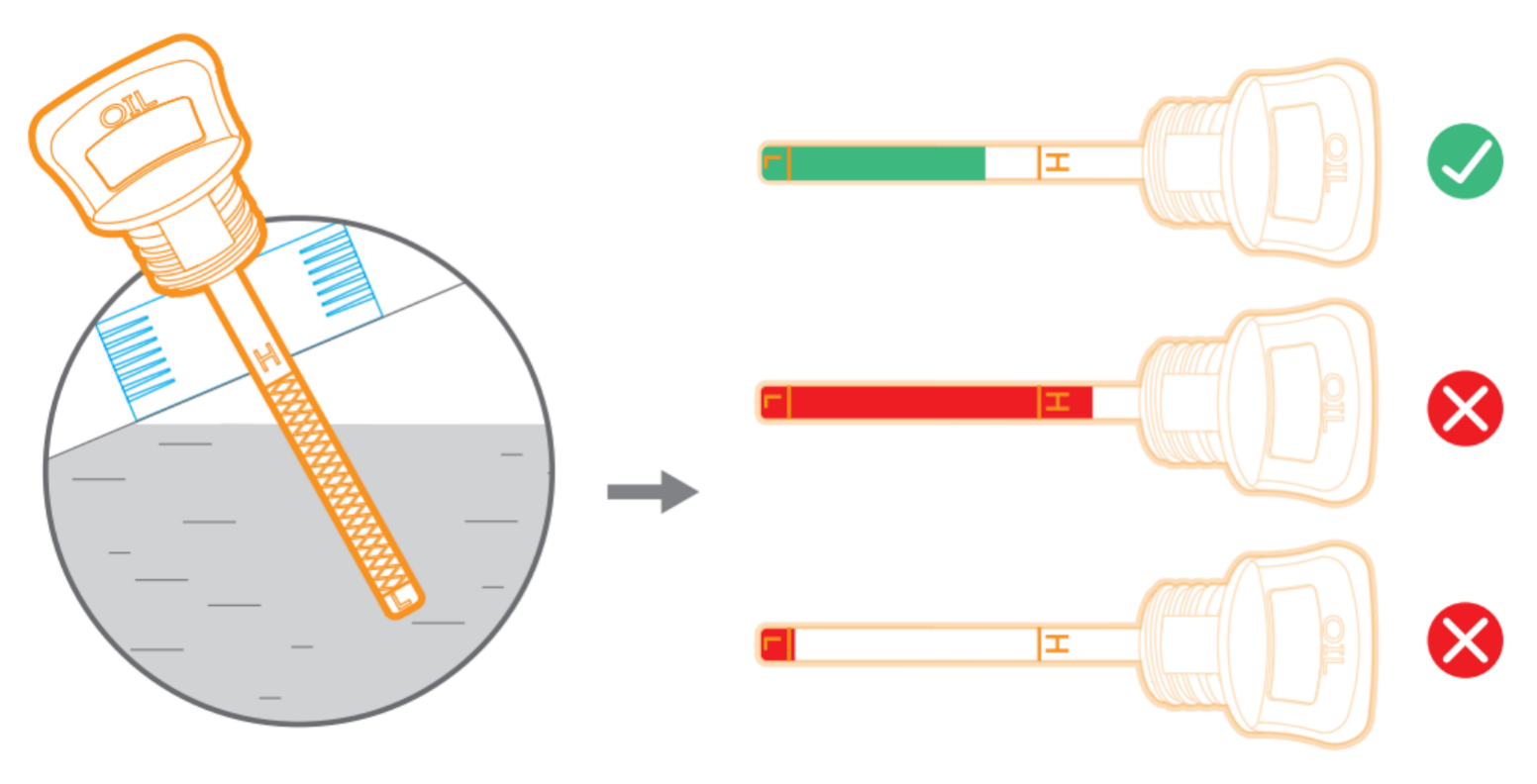
This may be caused by excessive engine oil, resulting in oil burning. Please shut down the generator and drain some of the oil using the oil drain tube to bring the oil level back within the proper range. Refer to the instructions in the generator user manual for the correct oil level.